SharePoint Correlation ID in error messages: what it is and how to use it
Applies To:
SharePoint Server 2013 Standard
If you're a user at a business and you're getting errors, contact the person who manages your business's internal website. These types of problems can often only be fixed by the webmaster (SharePoint admin) or someone at your company.
If you're a SharePoint admin, webmaster, or site manager, and your users are asking questions about correlation IDs, this can help you.
What a correlation ID is and isn't
The correlation ID is not an error number or code. Simply, it's a GUID (globally unique identifier) that's automatically generated for every request that the SharePoint server receives. It's unique to each request, not each error. However when an error occurs, the error message contains the correlation ID that was valid for the request at the time.It is meant to be used to help a SharePoint Admin trace what was happening at the time of an error. It is only valuable as an interactive tool to help the Admin track down your error. An Admin uses the correlation ID as "breadcrumbs" to retrace a requests or processes in the SharePoint Unified Logging System (ULS) to find what leads up to and causes a problem. If SharePoint gets an error that it can't identify while working on that task, it posts an "Unexpected error has occurred" message, and includes the correlation ID. The correlation ID can help find out what happened but doesn't identify what happened.
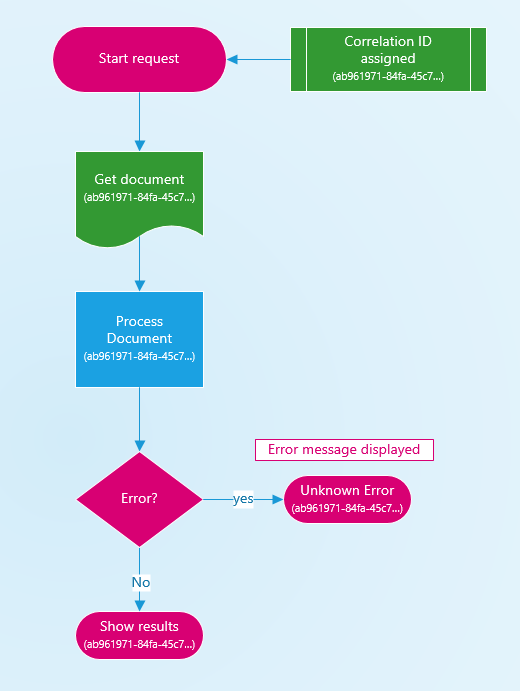 Successful requests are tagged with a correlation ID as well as
failed ones. The ID is unique and different for every new request, and
only lasts the duration of the request. It is not like a Windows error
which gives you an 80xxxxxx number that identifies the exact problem. It
doesn't help to search for a specific correlation ID on the web, as
every single one is different and unique to your server and that point
in time.
Successful requests are tagged with a correlation ID as well as
failed ones. The ID is unique and different for every new request, and
only lasts the duration of the request. It is not like a Windows error
which gives you an 80xxxxxx number that identifies the exact problem. It
doesn't help to search for a specific correlation ID on the web, as
every single one is different and unique to your server and that point
in time. Where a correlation ID is valuable is tracing through a process. SharePoint creates a log (ULS) of everything it does when processing requests, and the correlation ID is basically the thread that ties each step together. Since SharePoint does thousands of requests at the same time, the correlation ID can be used to filter out just the steps that SharePoint was doing for any given request.
For the Admin, a correlation ID can be used to trace errors, as well as performance problems and other issues. By using the correlation IDs for requests that are exhibiting the problematic behavior, they can investigate deeper. If no failure is happening and no error message is being generated, the developer dashboard can be used to view the correlation ID generated by the processes.


No comments:
Post a Comment